 Skip to content


Try off-device letter-sound and counting activities, then compare pretend laptops with activity models using controls, task fit and verified features.
What makes a learning laptop useful from four to seven?
Ask whether a key simply makes a sound or lets a child choose a letter, hear a prompt and try again. A four-year-old may enjoy finding the first letter of their name. An older child may want several letters or a repeatable word activity. Check the actual program list and language on the selected device.
A learning laptop for a four-year-old is worth considering only when its actual controls and activities fit the child. Start by deciding whether you want a prop for pretend office play, a toy with documented letter or number activities, or access to real software. A keyboard-shaped toy with lights and music does not automatically provide phonics instruction, counting lessons or working computer functions.
This guide helps you compare those formats and includes two optional activities that work without a laptop. They are examples for shared play, not a curriculum, assessment or promise of improved memory, attention or school readiness.
What kind of “learning laptop” are you comparing?
A pretend laptop
A pretend laptop is a prop for copying familiar actions: typing an order, booking a pretend appointment or talking through an office story. It may have lights and sounds, but those do not prove that each key represents a letter or that the toy checks an answer. Choose this format for role play, not for a lesson sequence that the listing has not demonstrated.
An electronic activity laptop
This format may offer fixed prompts, matching games or other built-in activities. Treat each feature as a separate question: Does it say letter names, letter sounds, words or something else? Does a number key name a numeral or show a group of objects? Can the child repeat a prompt? Only documented functions of the exact model belong in the comparison.
A tablet or real computer
These are general-purpose devices. Software, rather than the laptop shape, determines the activity. They require adult decisions about content, accounts, purchases and privacy. They are a different buying decision from a pretend toy, and a four-year-old does not need one simply because a toy is labelled “learning.” If you already own a suitable device, identify the specific shared activity before considering another purchase.
Six feature checks that reveal more than the activity count
Use the questions below with a manual, clear product demonstration or seller response. If an important answer is missing, mark it “unconfirmed” rather than filling the gap from a similar-looking model.
- 1. Starting, repeating and stopping
- Ask how an activity begins and how to hear a prompt again. A child who misses the first instruction needs a usable repeat route, not necessarily a bigger menu. Check whether exit and mode buttons are distinguishable from answer keys. These are buying criteria, not confirmed features of any current model.
- 2. What the keys actually do
- Look for a demonstration of one letter key and one number key. Do they produce a related response or simply trigger a melody? Are printed symbols legible? A decorated keyboard can work perfectly well for pretend play while being unsuitable for a specific letter-matching activity.
- 3. Letter names, sounds and language
- Confirm the spoken language and the type of response. Naming the letter M is different from producing the sound at the start of “moon.” Ask whether the audio is clear and whether the wording suits the language used at home. Do not infer a phonics mode from an alphabet printed on the case.
- 4. Numbers versus quantities
- A toy saying “three” offers a different experience from asking a child to count three objects. Check whether there are actual quantities to inspect, how an answer is entered and what happens after a wrong selection. You can supply objects yourself, but that is an adult-led extension, not a built-in product function.
- 5. Sound, display and access
- Ask whether sound can be lowered or muted, whether instructions also appear visually and whether a display is printed or functioning. Audio-only prompts may not meet every child’s access needs. Buttons should be usable from a comfortable position without requiring the child to follow flashing lights or rapid instructions.
- 6. Physical and ownership details
- Check manufacturer age guidance, dimensions, included accessories, battery requirements and battery-compartment instructions. Consider storage, a place for any mouse, and the cost of power supplies that are not included. Pictures do not establish drop resistance, materials testing or suitability for younger siblings.
What can a child practise, without inflated claims?
Describe the observable action: finding a printed letter, counting objects one at a time, asking a pretend customer a question or taking a turn. These are clearer than saying a toy “boosts working memory” or “builds confidence.” Correct button presses also do not establish that a child can use the same idea in a book or with objects.
The American Academy of Pediatrics’ explanation of its toy-selection guidance emphasizes play and interaction between children and caregivers rather than treating electronic features as necessary for learning. That supports realistic expectations; it does not validate the results of any laptop sold here.
Activity card 1: Find a letter, then hear a sound
Hypothetical adult-led example, not a built-in toy feature. Use two sheets or cards, each showing the same large capital M, plus a picture of a moon and a picture of a sun. Draw the pictures yourself if convenient. A toy is optional; if its keyboard clearly has an M, it can provide one more place to find the same letter.
- Match the shape. Show the M card and say its name, “em.” Invite the child to find an identical M on a second matching M card prepared for this game, or on a clearly labelled M key you have verified on the actual toy. If the toy uses lowercase letters, explain and show the difference rather than expecting an identical visual match.
- Separate name from sound. Say that M can represent the /m/ sound, as at the beginning of “moon.” Model a gentle continuous “mmm,” without adding an “uh” sound.
- Offer a concrete choice. Name both pictures aloud: “moon” and “sun.” Ask which begins with “mmm.” The intended answer is moon. A child may point rather than speak.
- Reconnect to a real object or book. Look for M in a familiar name or a book together. Do not require the child to produce a long list of words or explain every use of the letter.
Make it easier: use only the moon picture and model the sound together. Change the task: if matching letters is enjoyable but the sound question is not, stay with matching. Do not treat the two tasks as the same skill. NAEYC’s guide to letter–sound relationships explains why letter names and the sounds letters represent need to be distinguished.
Access option: use large high-contrast cards and allow pointing, eye gaze or an adult placing the chosen card. For a child who cannot access spoken sound play, keep this as a visual matching game rather than claiming the adaptation is equivalent phonics practice. Use the family’s language and appropriate letter–sound examples; English examples do not transfer automatically to every language.
Activity card 2: Make an order of three
Hypothetical adult-led example, not a product claim. Set out three large, age-appropriate blocks, a tray and a card showing the numeral 3. Avoid small counters if they are unsuitable for the child or accessible to younger children. A toy laptop can be the pretend shop till, but its buttons need not work.
- Place the order. Say, “Please put three blocks on the tray.” Point to the 3 card, without requiring the child to recognise the numeral first.
- Count each block once. Move one block at a time onto the tray, saying or signing one number per block: one, two, three. If a block is counted twice, spread them out and try together.
- Ask how many. After counting, say, “Three blocks altogether.” The last number tells how many are in this group; merely reciting number words is a different task.
- Change the arrangement. Put the same three blocks in a different arrangement. Count again if the child wants to check. No blocks were added or removed, so the answer is still three.
Make it easier: begin with one or two blocks and help move them. Make it different: switch shopper and shopkeeper, then ask for another small quantity the child enjoys counting. The point is matching one number to one object and discussing the total, not completing the order quickly. These concepts are described in Head Start’s preschool math framework; the activity above is an original example, not an assessment from that framework.
Access option: an adult can move the blocks while the child points, signs or indicates the next object. Keep the pieces within comfortable reach and reduce visual clutter. A successful shared turn is enough; there is no need to record a score.
Decide what to keep after trying an activity
Notice the practical obstacles. Did the child understand what to press? Was a prompt too quiet or too fast? Did pretend shopping become more interesting than the electronic mode? Those observations can help you adjust the materials or choose a different format. They do not measure a child’s intelligence or predict later achievement.
If using a functioning screen, include the session in your family’s media routine rather than treating all “learning” content as exempt. The AAP’s media questions for toddlers and preschoolers offer context for choosing content and making room for other activities. Paper letters, books, conversation and blocks remain usable without a screen.
Keep historical features out of a current comparison
No current notebook is verified here as providing the letter or quantity activities above or as an age-four recommendation. A pretend format with lights and music does not establish phonics, counting, text entry or a functioning display. Obtain the selected model's actual instructions and age guidance. If batteries are excluded, confirm the required type and quantity.
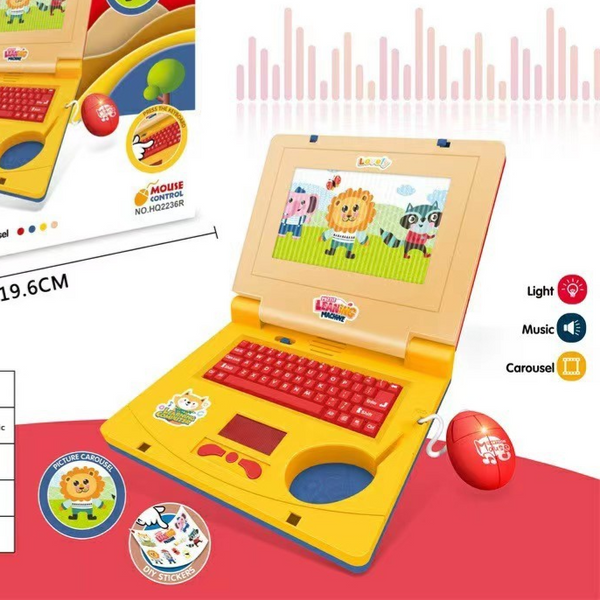
An older color-screen learning-laptop model with a mouse is unavailable through its former product page. That historical screen was not screen-free, and neither the screen nor mouse description transfers to a replacement. The off-device activities in this guide remain separate from any product's documented functions.
Before you choose
Use the two activity cards to identify a real gap
For finding M, paper already provides a visible letter and an adult can explain the name and sound. For an order of three, suitable blocks make the quantity visible. A laptop purchase is unnecessary if these are the activities the child wants and the existing setup works.
If a different response is wanted, name it precisely: an independently replayable spoken prompt, a particular accessible control or a pretend keyboard shape. Confirm that function in the exact model, along with age guidance, power, included parts and how the activity ends. Do not buy a large activity total hoping that it contains the missing task.
After trying a card, record one obstacle and one choice: keep the materials, adjust support, try another permitted format or stop. The child may prefer letter matching to sound play, or moving blocks to recognizing a numeral. Those are different tasks, not a score for readiness.
Compare formats in Toy Laptops for Kids. Other routes include Reading & Writing Toys, Counting & Math Toys and Educational Toys for 4-Year-Olds. Review each product separately; these collection names do not guarantee an activity or suitability.